[문제]
서버내 nginx 프로그램이 정적파일(static file)인 style.css를 불러오지 못한다.
[Facts/현상황]
- 현재 http://www.verypicker.com 이라는 사이트를 운영중이다.
- django 프레임워크를 통해 만들었다.
- AWS를 이용해 배포(deploy)하였다.
- 주소를 통해 접속하면 ‘landing’ 이라는 앱이 실행되도록 코딩했다(urls.py)
- 2022년 3월 15일, 로컬드라이브에 저장해둔 django framework 폴더를 다른 폴더의 하부폴더로 이동후 git hub에 업데이트하였다. 이후 업데이트된 github structure를 서버에 다운받은 다음부터 문제가 발생했다.
- 2022년 3월 15일경(약 열흘전) 이전에는 css 파일 로드가 정상적으로 이뤄졌다. 문제 발생 이전 약 3개월동안 사이트는 정상적으로 운영(작동)되었다.
[문제의 원인 추정목록]
| [ 추정 1 ] | [django] Settings.py 의 문제다 |
| [ 추정 2 ] | [django] nginx 설정값이 잘못되었다. |
| [ 추정 3 ] | [django] urls.py 의 문제다 |
| [ 추정 4 ] | [django] gunicorn의 설정값이 잘못됨 |
| [ 추정 5 ] | [django] nginx, gunicorn이 설치상에 오류가 생겼다. |
| [ 추정 6 ] | [django] 서버 gateway 호출 방식 (wsgi.conf)의 문제다 |
| [ 추정 7 ] | [AWS] 아마존 서버의 문제다 |
- [ 추정 1 ] verypicker(기본폴더) 아래 ‘settings.py ‘의 Static Root, Static URL, STATICFILES_DIR 설정값에 문제가 있을 것이다.
- 1) STATIC_ROOT 수정: 프로젝트 폴더(이 경우 현재는 vp) 내 manage.py가 위치한 곳에서 [$python manage.py collectstatic] 명령을 하면 프로젝트(vp)내 모든 static 파일(i.e., css 파일, 이미지파일)이 저장되는 폴더명과 위치를 설정하는 곳
- 2) STATIC URL 수정: STATIC_ROOT 폴더의 파일을 불러오기 위한 URL 설정
- 3) STATICFILES_DIR 수정: STATIC_ROOT 폴더 안에서의 위치를 알려주어 어떤 파일을 로드해야하는지 설정하는 구역
STATIC_ROOT = os.path.join(BASE_DIR, '.static')
STATIC_URL = '/static/'
STATICFILES_DIRS = [
os.path.join(BASE_DIR,'static'),
]- [ 추정 2 ] nginx 설정값(4개 파일) 이 잘못되었다. (i.e., ‘/etc/nginx/’ 내부파일 – 아래 번호 참조)
- 1) ‘/etc/nginx/nginx.conf‘ 수정
user ubuntu;
worker_processes auto;
pid /run/nginx.pid;
include /etc/nginx/modules-enabled/*.conf;

events {
        worker_connections 768;
        # multi_accept on;
}


http {

        ##
        # Basic Settings
        ##

        sendfile off;
        tcp_nopush on;
        tcp_nodelay 65;
        types_hash_max_size 2048;
        # server_tokens off;

        # server_names_hash_bucket_size 64;
        # server_name_in_redirect off;

        include /etc/nginx/mime.types;
        default_type application/octet-stream;

        ##

        ##
        # SSL Settings
        ##

        ssl_protocols TLSv1 TLSv1.1 TLSv1.2 TLSv1.3; # Dropping SSLv3, ref: POODLE
        ssl_prefer_server_ciphers on;

        ##
        # Logging Settings
        ##

        access_log /var/log/nginx/access.log;
        error_log /var/log/nginx/error.log;


        ##
        # Gzip Settings
        ##

        gzip on;

        # gzip_vary on;
        # gzip_proxied any;
        # gzip_comp_level 6;
        # gzip_buffers 16 8k;
        # gzip_http_version 1.1;
        # gzip_types text/plain text/css application/json application/javascript text/xml application/xml application/xml+rss text/javascript;

        ##
        # Virtual Host Configs
        ##

        include /etc/nginx/conf.d/*.conf;
        include /etc/nginx/sites-enabled/*;
- 2) ‘/etc/nginx/sites-available/verypicker.com.conf 수정
server {
        listen 80;
        server_name 3.34.187.29;


        location = /favicon.ico { access_log off; log_not_found off; }

        location /static/ {
                alias /env/vp/static/;
        }

        location / {
        include proxy_params;
        proxy_pass http://127.0.0.1:8000;
        }
}
- 3) ‘/etc/nginx/mimes.types‘ 수정
types {
    text/html                             html htm shtml;
    text/css                              css;
    text/xml                              xml;
    image/gif                             gif;
    image/jpeg                            jpeg jpg;
    application/javascript                js;
    application/atom+xml                  atom;
    application/rss+xml                   rss;

    text/mathml                           mml;
    text/plain                            txt;
    text/vnd.sun.j2me.app-descriptor      jad;
    text/vnd.wap.wml                      wml;
    text/x-component                      htc;

    image/png                             png;
    image/tiff                            tif tiff;
    image/vnd.wap.wbmp                    wbmp;
    image/x-icon                          ico;
    image/x-icon                          ico;
    image/x-jng                           jng;
    image/x-ms-bmp                        bmp;
    image/svg+xml                         svg svgz;
    image/webp                            webp;

    application/font-woff                 woff;
    application/java-archive              jar war ear;
    application/json                      json;
    application/mac-binhex40              hqx;
    application/msword                    doc;
    application/pdf                       pdf;
    application/postscript                ps eps ai;
    application/rtf                       rtf;
    application/vnd.apple.mpegurl         m3u8;
    application/vnd.ms-excel              xls;
    application/vnd.ms-fontobject         eot;
    application/vnd.ms-powerpoint         ppt;
    application/vnd.wap.wmlc              wmlc;
    application/vnd.google-earth.kml+xml  kml;
    application/vnd.google-earth.kmz      kmz;
    application/x-7z-compressed           7z;
    application/x-cocoa                   cco;
    application/x-java-archive-diff       jardiff;
    application/x-java-jnlp-file          jnlp;
    application/x-makeself                run;
    application/x-perl                    pl pm;
    application/x-pilot                   prc pdb;
    application/x-rar-compressed          rar;
    application/x-redhat-package-manager  rpm;
    application/x-sea                     sea;
    application/x-sea                     sea;
    application/x-shockwave-flash         swf;
    application/x-stuffit                 sit;
    application/x-tcl                     tcl tk;
    application/x-x509-ca-cert            der pem crt;
    application/x-xpinstall               xpi;
    application/xhtml+xml                 xhtml;
    application/xspf+xml                  xspf;
    application/zip                       zip;

    application/octet-stream              bin exe dll;
    application/octet-stream              deb;
    application/octet-stream              dmg;
    application/octet-stream              iso img;
    application/octet-stream              msi msp msm;

    application/vnd.openxmlformats-officedocument.wordprocessingml.document    docx;
    application/vnd.openxmlformats-officedocument.spreadsheetml.sheet          xlsx;
    application/vnd.openxmlformats-officedocument.presentationml.presentation  pptx;

    audio/midi                            mid midi kar;
    audio/mpeg                            mp3;
    audio/ogg                             ogg;
    audio/x-m4a                           m4a;
    audio/x-realaudio                     ra;

    video/3gpp                            3gpp 3gp;
    video/mp2t                            ts;
    video/mp4                             mp4;
    video/mpeg                            mpeg mpg;
    video/quicktime                       mov;
    video/webm                            webm;
    video/x-flv                           flv;
    video/x-m4v                           m4v;
    video/x-mng                           mng;
    video/x-ms-asf                        asx asf;
    video/x-ms-wmv                        wmv;
video/x-msvideo avi;- 4) ‘/etc/nginx/conf.d ‘ 수정 : (비어있음)
[ 추정 3 ] verypicker(기본폴더) 아래 ‘urls.py‘의 형식이 잘못되어 파일을 찾지 못한다.
from django.contrib import admin
from django.urls import path, include
from landing import views as landing_views

urlpatterns = [
    path('admin/', admin.site.urls),
    path('', include('landing.urls')),
    path('landing/', include('landing.urls')),
]
[ 추정 4 ] gunicorn 의 설정값이 잘못되었다.
- 1) $sudo systemctl gunicorn restart
- 2) $sudo systemctl daemon-reload
- 3) $sudo gunicorn restart
[ 추정 5 ] nginx, gunicorn 소프트웨어가 완전히 망가졌다.
- 1) nginx 삭제후 다시 깔기
- 2) gunicorn 삭제후 다시 깔기
[ 추정 6 ] 서버가 웹 애플리케이션(예: landing/)에 호출하는 방식이 잘못되었다. 다시말해, wsgi.py 파일이 잘못되었다.
import os

from django.core.wsgi import get_wsgi_application

os.environ.setdefault('DJANGO_SETTINGS_MODULE', 'verypicker.settings')

application = get_wsgi_application()
[ 추정 6 ] 아마존 서버의 문제라 재부팅을 해야한다. (Cache의 문제일 수 있음)
[그밖에]
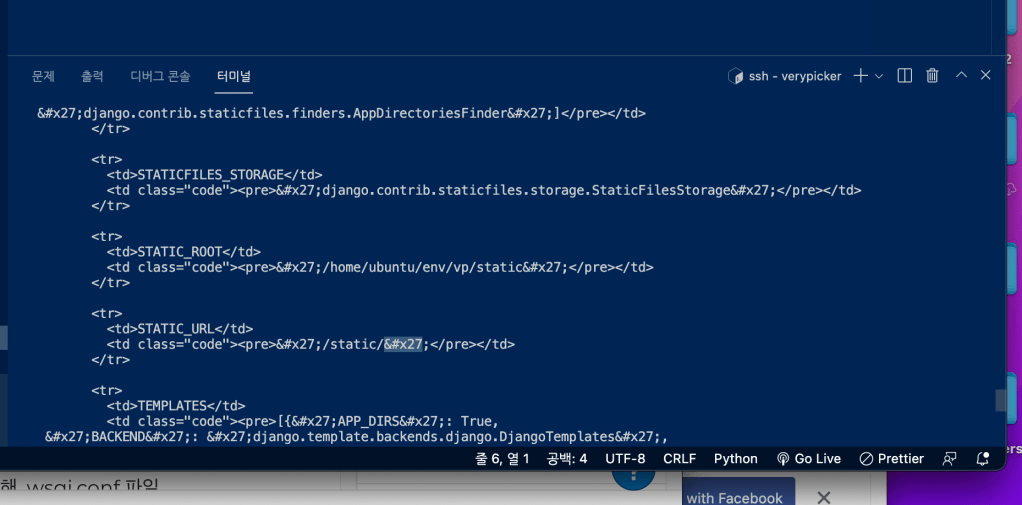
- curl -i command 127.0.0.1 명령했더니 나타난 오류
STATIC_ROOT 코드줄에 보면 ' 과 같은 알 수 없는 문자가 들어가있음

 사이트 제목